Voice (TTS/STT)
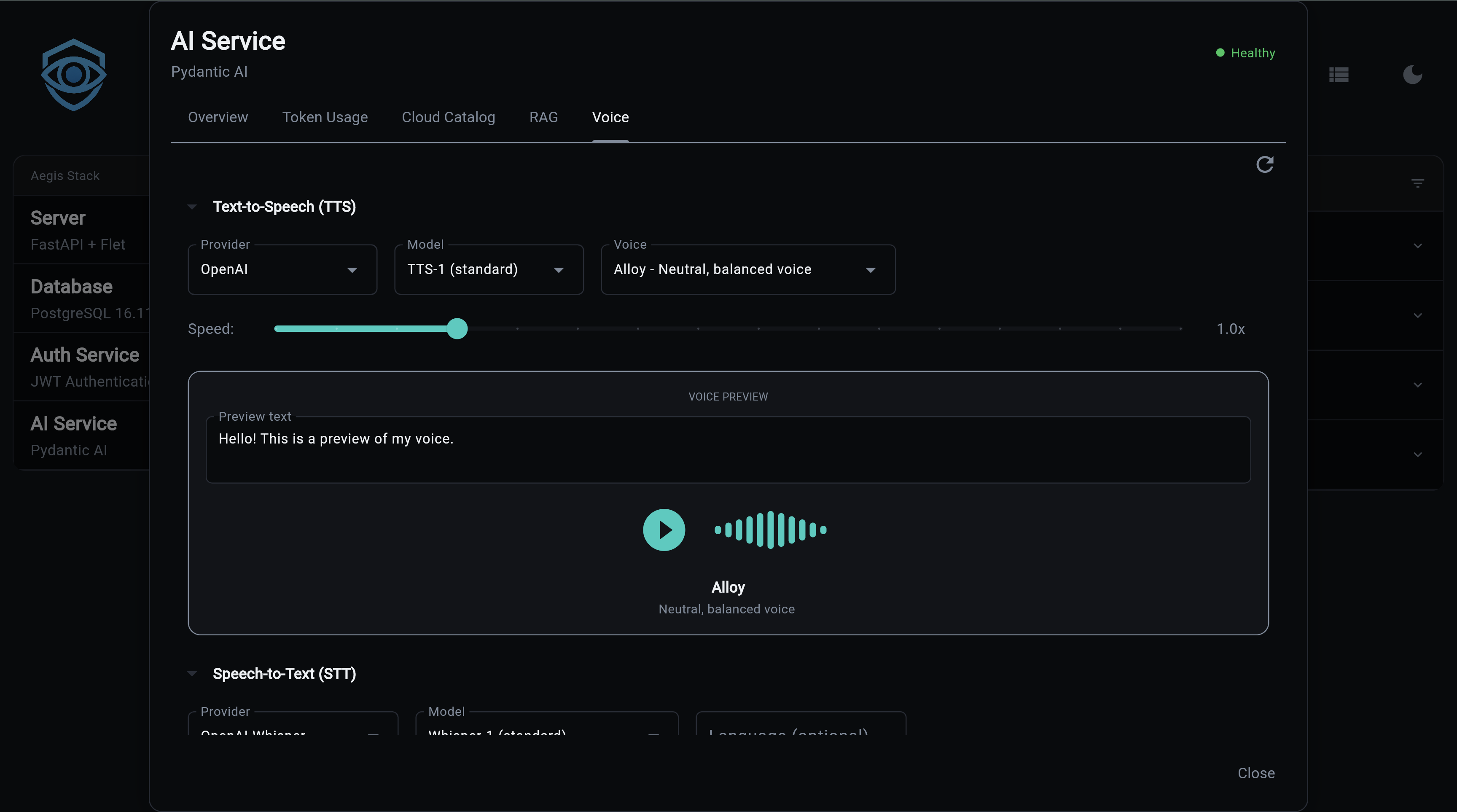
Voice capabilities add Text-to-Speech (TTS) and Speech-to-Text (STT) to the AI service. Multiple providers are supported, from cloud APIs to fully local inference.
Experimental Feature
Voice is currently experimental. Some features may not work out of the box and will require configuration on your part. For example, TTS and STT providers that need API keys (like OpenAI) may return errors or hang in the frontend if the key is not set. Make sure your provider credentials are configured before using voice features.
Enable at Project Generation
Voice is an optional feature enabled at project generation:
What You Get
- Text-to-Speech - Convert text to audio with multiple voices and speed control
- Speech-to-Text - Transcribe audio with timestamps and segment detection
- Multiple providers - Cloud (OpenAI, Groq) and local (Whisper, faster-whisper)
- Voice catalog - Browse providers, models, and voices via API
- Voice previews - Generate audio samples to compare voices
- Usage tracking - TTS and STT operations tracked alongside LLM usage
TTS Providers
| Provider | Type | Models | Voices | Streaming | API Key |
|---|---|---|---|---|---|
| OpenAI | Cloud | tts-1, tts-1-hd | alloy, echo, fable, onyx, nova, shimmer | Yes | OPENAI_API_KEY |
OpenAI TTS
Two models available:
- tts-1 - Optimized for speed, lower latency
- tts-1-hd - Higher quality audio, slightly slower
Six voices: alloy, echo, fable, onyx, nova, shimmer
# .env configuration
TTS_PROVIDER=openai
TTS_MODEL=tts-1
TTS_VOICE=alloy
TTS_SPEED=1.0   # 0.25 to 4.0
STT Providers
| Provider | Type | Model | Speed | Quality | Requires |
|---|---|---|---|---|---|
| OpenAI Whisper | Cloud | whisper-1 | Good | High | OPENAI_API_KEY |
| Groq Whisper | Cloud | whisper-large-v3-turbo | Very fast | High | GROQ_API_KEY |
| Local Whisper | Local | whisper-tiny to large-v3 | Varies | Varies | transformers, torch |
| faster-whisper | Local | tiny to large-v3 | 4x faster | High | faster-whisper |
OpenAI Whisper
Cloud-based transcription with segment timestamps:
Groq Whisper
Ultra-fast cloud transcription:
Local Whisper
Runs on your machine via HuggingFace transformers. Auto-detects GPU (CUDA, MPS) or falls back to CPU:
Requires: uv add transformers torch
faster-whisper
SYSTRAN's optimized implementation - 4x faster than standard Whisper with similar accuracy:
Requires: uv add faster-whisper
Supports compute types: default, float16, int8
API Endpoints
All endpoints are prefixed with /voice.
TTS Catalog
# List TTS providers
curl http://localhost:8000/voice/catalog/tts/providers | jq

# List models for a provider
curl http://localhost:8000/voice/catalog/tts/openai/models | jq

# List voices for a provider
curl http://localhost:8000/voice/catalog/tts/openai/voices | jq
Provider Response:
{
  "id": "openai",
  "name": "OpenAI",
  "type": "tts",
  "requires_api_key": true,
  "api_key_env_var": "OPENAI_API_KEY",
  "is_local": false,
  "description": "OpenAI TTS API"
}
Voice Response:
{
  "id": "alloy",
  "name": "Alloy",
  "provider_id": "openai",
  "model_ids": ["tts-1", "tts-1-hd"],
  "description": "A balanced, versatile voice",
  "category": "neutral",
  "gender": "neutral",
  "preview_text": "Hello, I'm Alloy..."
}
STT Catalog
# List STT providers
curl http://localhost:8000/voice/catalog/stt/providers | jq

# List models for a provider
curl http://localhost:8000/voice/catalog/stt/openai_whisper/models | jq
Voice Settings
# Get current settings
curl http://localhost:8000/voice/settings | jq

# Preview settings (returns merged config without persisting)
curl -X POST http://localhost:8000/voice/settings \
  -H "Content-Type: application/json" \
  -d '{"tts_voice": "nova", "tts_speed": 1.2}'
Note
This endpoint returns what the settings would look like if applied. To actually persist changes, update the corresponding environment variables in your .env file.
Settings fields: tts_provider, tts_model, tts_voice, tts_speed, stt_provider, stt_model, stt_language
Voice Preview
Generate audio samples to compare voices:
# POST with body
curl -X POST http://localhost:8000/voice/preview \
  -H "Content-Type: application/json" \
  -d '{"voice_id": "alloy", "text": "Hello world"}' \
  --output preview.mp3

# GET (browser-friendly)
curl "http://localhost:8000/voice/preview/alloy?text=Hello+world&speed=1.0" \
  --output preview.mp3
Returns audio/mpeg content.
Voice Chat
A spoken turn is a typed turn with a microphone in front of it: the transcript becomes the user's message in the same conversation, answered by the same agent, as if it had been typed.
curl -X POST "http://localhost:8000/api/v1/ai/voice-chat?conversation_id=c-1&user_id=u-1&agent_slug=helper&surface=support&transcription_hint=Aegis" \
  -F "audio=@question.webm"
| Parameter | Meaning |
|---|---|
conversation_id |
Continue this conversation (a new one when omitted) |
user_id |
Who spoke: owns the turn, and STT/TTS usage is recorded against it |
agent_slug |
The agent that answers, exactly as for a typed turn; the stack never picks one |
surface |
The history scope the turn lands in, as for a typed turn |
transcription_hint |
Names the transcriber should spell right, sent to it as its prompt |
voice_mode |
Return the answer as plain spoken sentences |
return_audio |
Also synthesize those sentences and return audio/mpeg |
The audio is not stored: the conversation holds the words, and the usage
records hold the cost. The spoken version of an answer is the agent's own
words with the markdown stripped (voice/spoken.py), not a second model
call. /api/v1/ai/synthesize takes form fields (text, voice, speed).
Catalog Summary
{
  "tts": {
    "provider_count": 1,
    "model_count": 2,
    "voice_count": 6,
    "providers": ["openai"]
  },
  "stt": {
    "provider_count": 4,
    "model_count": 4,
    "providers": ["openai_whisper", "whisper_local", "faster_whisper", "groq_whisper"]
  },
  "current_config": {
    "tts_provider": "openai",
    "tts_model": "tts-1",
    "tts_voice": "alloy",
    "stt_provider": "openai_whisper",
    "stt_model": "whisper-1"
  }
}
Live Calls
The phone beside the chat's microphone opens a live call on the engine the voice profile names (Gemini Live, an OpenAI realtime model, or GPT-Live). The server holds the engine's session; the page carries the audio over one WebSocket. The agent on a call is built the way a typed turn builds it: the same prompt, memory modules, contexts and tools, plus how to talk on a call and a tool to end it.
- Working, not narrating. While the agent runs a step, the page plays soft key taps (the profile's "while it works" sound) instead of the agent announcing its lookups.
- The quiet. No provider ends a call on silence, and a call bills while
it is open, so the page counts real quiet: nobody speaking (from your
first sound, where the provider reports it: OpenAI and xAI do, Gemini
from your first transcribed word), no answer to what you just said still
coming, the agent's audio played out, nothing being worked on, not
muted. After the profile's
"check in after" seconds the agent asks if you are still there; still
quiet, it says goodbye, and the call ends a moment after that has played.
The status line counts the last stretch down. Anything you say starts the
count over. The rules live in
static/js/call-state.js, tested on Node (tests/js). - Noise. OpenAI realtime filters a laptop mic's noise and ends your turn when the thought does, not on a pause; Gemini waits 800ms of silence before ending it.
- Mute stops your voice going out (after a moment of silence, so the engine hears you stop) and pauses the quiet count.
Configuration
| Variable | Default | Description |
|---|---|---|
TTS_PROVIDER |
openai |
TTS provider |
TTS_MODEL |
tts-1 |
TTS model |
TTS_VOICE |
alloy |
Default voice |
TTS_SPEED |
1.0 |
Speed multiplier (0.25-4.0) |
STT_PROVIDER |
openai_whisper |
STT provider |
STT_MODEL |
whisper-1 |
STT model |
STT_LANGUAGE |
auto-detect | Language for transcription |
Data Models
TTS
- SpeechRequest -
text,voice,speed - SpeechResult -
audio(bytes),format(MP3),provider
STT
- AudioInput -
content(bytes),format,language,prompt(a spelling hint for the transcriber) - TranscriptionResult -
text,language,duration_seconds,provider,segments - TranscriptionSegment -
text,start,end,confidence
Source Files
| File | Purpose |
|---|---|
app/services/ai/voice/tts/providers.py |
TTS provider implementations |
app/services/ai/voice/tts/service.py |
TTS service |
app/services/ai/voice/tts/config.py |
TTS configuration |
app/services/ai/voice/tts/usage.py |
TTS usage tracking |
app/services/ai/voice/stt/providers.py |
STT provider implementations |
app/services/ai/voice/stt/service.py |
STT service |
app/services/ai/voice/stt/config.py |
STT configuration |
app/services/ai/voice/stt/usage.py |
STT usage tracking |
app/services/ai/voice/catalog.py |
Voice catalog (providers, models, voices) |
app/services/ai/voice/models.py |
Data models |
app/services/ai/voice/spoken.py |
An answer as it is said: markdown stripped |
app/components/backend/api/voice/router.py |
API endpoints |
Next Steps:
- AI Service Overview - Getting started
- Provider Setup - Configure AI providers
- API Reference - All REST endpoints
- CLI Commands - Command-line interface